Setup miCloud

Follow the following steps to setup miCloud:

  1. Download miEbooks app, by clicking on one of the downloadable links below.

Download for Windows device

Download for Android device

Download for Apple device

Follow the following steps to setup miEbooks to access the apps on the miCloud Program:

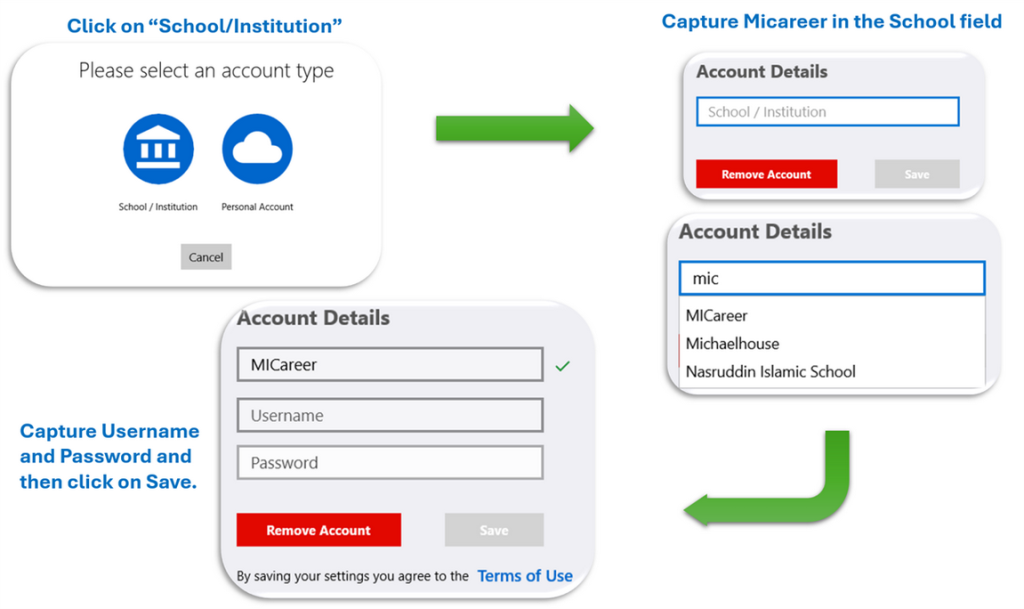
  1. Activate your Micareer profile on the miEbooks app as follows:
    1. Click on the Institution icon
    2. Capture/Select MiCareer from the drop-down menu on the “Name of Your School” field
    3. Capture your username (yourname@micareer.org)
    4. Capture your password (Sent to you via email/whatsapp)